
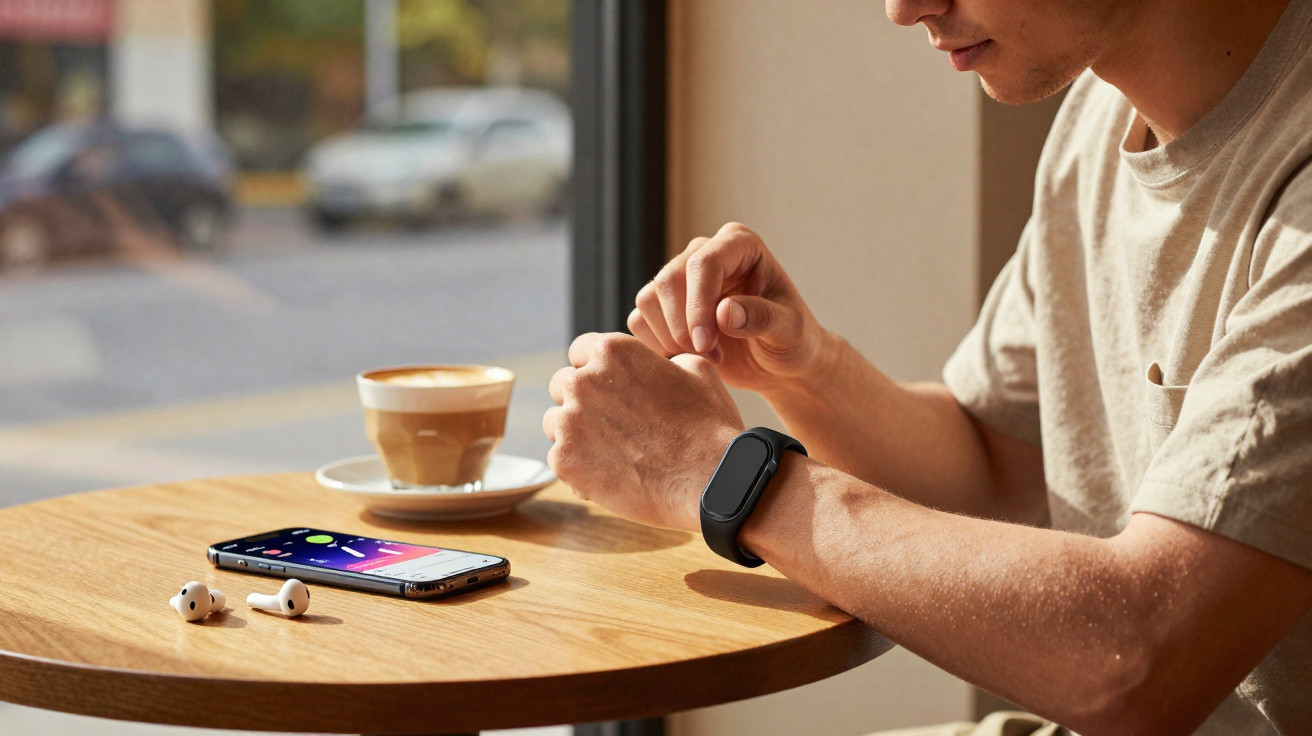
A screen-free connected wristband for €99, powered by Google AI: that is the promise of the Fitbit Air. I could not ignore such an offer, so I replaced my Apple Watch with this highly surprising wristband for a month.
The Google Fitbit Air is a discreet, lightweight (12 g) screen-free connected wristband priced at €99. It is designed to track everyday health, sleep and physical activity. One important caveat is that it has no GPS, which causes some frustrations when exercising (more on that later).
It does, however, carry a 5ATM rating, allowing it to withstand depths of up to 50 metres. Charging is handled through a magnetic USB-C connector, with a full 0–100% charge taking one hour.
For a month, I swapped my Apple Watch and relied solely on Google’s new wristband. Naturally, the lack of a screen meant I had to use the Google Health app (formerly Fitbit) very regularly to check my stats.
That covers the basics. Now for the real-world experience.
Fitbit Air at the best price
Base price: €99
| Retailer | Price | Offer |
|---|---|---|
| Amazon | €99 | View offer |
A discreet wristband
For years, the smartwatch has been regarded as the holy grail of health tracking. Yet a watch is not necessarily the best format for everyday monitoring. Watches are heavy, you may not want to sleep in one, and they need charging every day. Like millions of users, I had got into the habit of leaving my Apple Watch on its charging stand beside my bed. In other words, I knew absolutely nothing about half of my health data.
The Google Fitbit Air claims to solve this issue. Like the Whoop, Amazfit Helio Strap and Polar Loop, it belongs to this emerging category of screen-free connected wristbands. That means doing without notifications. I have no issue with that, as I disable them anyway because I find them too intrusive.
As with most of its rivals, Google has opted for a minimalist approach. The electronic module measures 34.9 x 17 x 8.3 mm, reaching 10 mm thick on the underside of the wrist. It comes in several colours: blue (my review unit), red or pale green in the fabric version, and black or cream in plastic. Google sells interchangeable straps for between €44 and €59. At 19 mm wide, the Fitbit Air sits between the Whoop 5.0 (27 mm) and the Polar Loop, making it one of the most discreet options on the market.
This pared-back design inevitably limits how you interact with the wristband: a double tap lets you check the battery or trigger the wake-up alarm. That is all. It is perfect for someone like me who wants fewer distractions.
Excellent for everyday tracking
Let us start with what the Fitbit Air does exceptionally well. Its everyday activity tracking is accurate, unobtrusive and continuous. There is no need to remember to “start” anything: the wristband continuously records step count, calories burned, heart rate, SpO2, heart rate variability (HRV) and skin temperature.
All this information is sent to the Google Health app (the former Fitbit app, now completely redesigned), which has an almost faultless interface. It is split into four tabs: Today (the day’s overview), Fitness, Sleep and Health. Information is well organised and easy to read: there is no need to dig through menus, as you can immediately see where you stand.
This setup delivers a continuity of tracking that I really appreciated. With my Apple Watch, and with other smartwatches, nights without a watch left gaps in my history. Above all, I had no sleep tracking whatsoever. I did try a connected ring, but its data did not feel accurate enough to me. With the Fitbit Air, I have a device that is comfortable at night and provides dependable data.
Sleep tracking with the Fitbit Air
The Fitbit Air is therefore the first connected device that has fully satisfied me for sleep monitoring. As explained above, I do not wear my Apple Watch at night. It is too bulky, too uncomfortable and lacks the battery life to last through a day and a night, so I charge it every day. The result is that I have had virtually no sleep data for years.
The Fitbit Air fixes that problem. The wristband is so light and slim that I forget I am wearing it. More importantly, its sleep monitoring is remarkably accurate. It analyses total duration, sleep stages (light, deep and REM), interruptions, overnight heart rate, SpO2 and HRV. Google Health then generates a sleep score similar to those found in connected-ring apps. If you choose the Premium subscription, it also offers personalised advice to improve sleep quality.
And it works. After a month, I changed my bedtime routine. The app made me realise, even though I already knew it, that weekend lie-ins did not make up for my weekday sleep deficit. I also found that I slept better if I had run or exercised during the day, eaten earlier in the evening, or stopped using screens several hours before bedtime.
The overall daily readiness score, available each morning, combines sleep, stress and recovery. It factors in not only the previous night’s sleep, but also your overnight resting heart rate.
In short, I loved sleeping with the Fitbit Air.
Not the best companion for sport
I ran the Adidas Paris 10K with the Fitbit Air on my wrist. As its name suggests, the route is exactly 10 km long. Yet the wristband credited me with more than 11 km.
The Fitbit Air’s main shortcoming is its lack of built-in GPS. For activities involving movement, it estimates distance from step count and an estimated stride length. This approach is adequate for a relaxed walk or an easy jog on a familiar route. However, it becomes seriously inadequate for more demanding athletes.
The Fitbit Air can use your smartphone’s GPS if you run with your phone, improving accuracy. But running with a smartphone is far from ideal. And what about other sports where your hands are occupied, such as tennis?
That said, I was very impressed by the automatic detection of endurance activities (walking, running and cycling), which can be sent to third-party apps such as Strava. I would not necessarily recommend enabling it, because every walk becomes a Strava activity. For two weeks, my followers were therefore able to track my journeys. Thanks for the privacy.
For all other activities, including yoga, strength training and HIIT, you have to start them manually from the Google Health app. It is a little tedious.
The Fitbit Air is therefore clearly positioned as a passive health-tracking and recovery tool, rather than a training companion. Since finishing this test, I have in fact put on my sports smartwatch for every workout, alongside the Fitbit Air.
Google Health: the pleasant surprise
Google Health is the Fitbit Air’s brain. Available free on iOS and Android, the app gathers all wristband data into four thoughtfully designed tabs (Today, Fitness, Sleep and Health) and displays it clearly, without drowning users in unreadable graphs.
There is good news for Apple users: integration with Apple Health works. You can also import nutrition, carbohydrate, calories burned and step data from Apple Watch into Google Health. The two apps can therefore coexist without friction.
The Google Health Premium subscription (€8.99/month or €79.99/year) unlocks Google Health Coach, a Gemini-based AI available 24/7. The coach is neither pointless nor essential. It puts the data into context effectively, can create a personalised training plan, and adapts when your circumstances change, such as during travel, injury or a busy week. But the wristband is already very comprehensive without a subscription.
Fitbit Air at the best price
Base price: €99
| Retailer | Price | Offer |
|---|---|---|
| Amazon | €99 | View offer |
My verdict on the Fitbit Air
The Google Fitbit Air is the best product Google has ever made to encourage people to look after themselves. At €99, it enters a category that has until now cost two to three times as much (Whoop, Oura), with a free app that I consider the best in its segment.
Anyone who does not wear their watch at night and wants to track health data without looking at a screen will find it an almost perfect device.
However, for regular athletes who want precise workout tracking, the lack of GPS is a genuine drawback. The Fitbit Air does not entirely replace a smartwatch, but I hope Google releases a next-generation model with GPS. If it does, it may well have found its winning formula.
Google Fitbit Air
€99
Overall score
9.5/10
What we like
- Lightweight, comfortable and discreet
- Excellent sleep and everyday activity tracking
- One-week battery life
- Google Health, the best activity-tracking app
- Low price
What we like less
- No GPS, making sports tracking inaccurate
- Limited automatic activity detection
- The app must be used for many sports
- Health Coach is paid and not essential



Comments
No comments yet. Be the first to comment!
Leave a Comment